
Actief
PT-SW-U324
2x4 USB 3.2 Gen1-switch met 5Gbps en stroombeveiliging
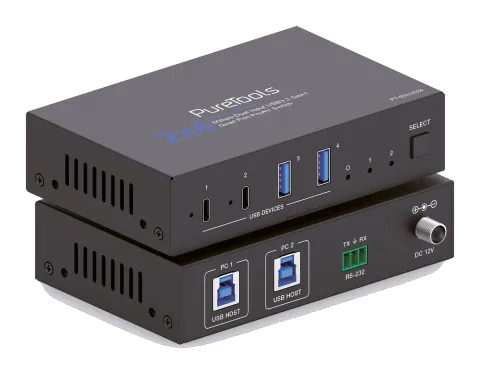
De PT-SW-U324 is een USB 3.2 Gen1 Switcher met twee onafhankelijk schakelbare USB-B hostpoorten en vier apparaatpoorten—twee USB-C en twee USB-A—met ondersteuning voor datasnelheden tot 5Gbps. Elke apparaatpoort biedt …
HandleidingBesturing (TCP/IP)FAQSpecificatiesDatasheetCEBeschikbare besturingsinterfaces. Klap een actief type uit om de volledige commandotabel te zien.
Geen passende commando’s.
API-commando's15 commando’sActief
Bron: handleiding, hoofdstuk API Commands, pagina 14
| Commando | Beschrijving | Voorbeeld | Antwoord | |
|---|---|---|---|---|
| ? | Haal de lijst van alle commando's op | ? | ||
| help | Haal de lijst van alle commando's op | help | ||
| get fw version | Firmwareversie opvragen | get fw version | 1.0.0 | |
| set reboot | Herstart het apparaat | set reboot | Reboot... System Initializing... Initialization Finished! FW: 1.0.0 | |
| set reset | Reset naar fabrieksinstellingen | set reset | Sure to RESET to default settings? Type "Yes" after next prompt to confirm... Input 1 | |
| get status | Haal systeemstatus op | get status | Please refer to the note at the end of the list. | |
| set key on/off | Stel toets op het voorpaneel in aan/uit Standaard: aan | set key on set key off | Set key on. Set key off. | |
| get key | Status van frontpaneelknop aan/uit opvragen | get key | Key on. | |
| set input x | Stel USB-hostinput in (x=1~2) x=1: USB-hostinput 1 x=2: USB-hostinput 2 Standaard: 1 | set input 1 | Set USB host input 1. | |
| get input | USB-hostingangspoort ophalen | get input | 1 | |
| get usb5v | USB-hostingang 5V ophalen | get usb5v | Host 1: 5V Host 2: none | |
| set autoswitch x | Schakel automatische omschakeling aan/uit (USB 5V detectie) x=Aan, Uit Standaard: aan | set autoswitch x | Set autoswitch on. | |
| get autoswitch | Haal de status van automatische schakeling op | get autoswitch | Autoswitch on. | |
| set output x usb5v y | Stel USB-apparaat output in (x=0~4) 5V naar y x=[0...4]:0:Alle, 1:USB-C 1, 2:USB-C 2, 3:USB-A 3, 4:USB-A 4 y=0: Schakel 5V-uitgang uit y=1: Volg host y=2: Forceer altijd 5V-uitgang Standaard: 1 | set output 0 usb5v 1 | Set all USB device output 5V:follow host. | |
| get output x usb5v | USB-apparaatuitgang (x=0~4) 5V-status ophalen | get output 0 usb5v | USB-C 1 5V: follow host USB-C 2 5V: follow host USB-A 3 5V: follow host USB-A 4 5V: follow host |